

Table of Contents
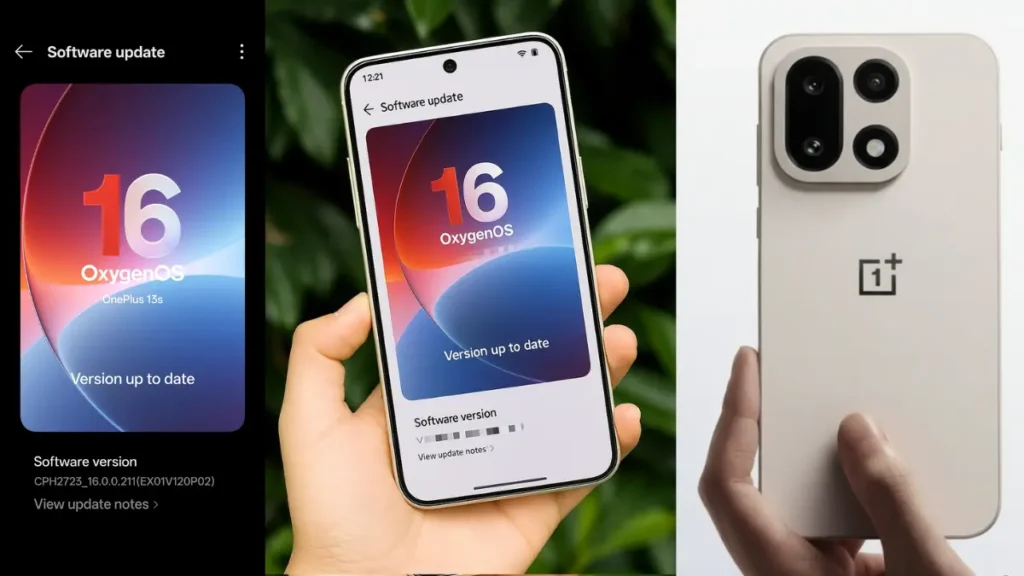
The flagship OnePlus 13 series has officially begun receiving the OxygenOS 16 update in India. This highly anticipated release brings the latest Android-based experience with major improvements in performance, design, AI tools and connectivity. If you own the OnePlus 13 or 13s, here’s everything you need to know — from features to rollout tips.
Why the OxygenOS 16 Update Matters – OnePlus 13 OxygenOS 16 Update
Updating to OxygenOS 16 is more than just a routine fix. This upgrade introduces:
- A visual redesign with “Liquid Glass” styling and smoother animations, bringing a fresh modern look.
- Deep AI integration across system apps—smart editing in photos & video, content-capture hub, smarter notes and voice tools. Nokiamob | Welcome to the Nokia World!
- Faster, more fluid experience thanks to new engine optimisations (e.g., “Trinity Engine”, “Parallel Processing”). Nokiamob | Welcome to the Nokia World!
- Enhanced connectivity features: improved cross-device sharing, better cloud privacy, device-to-PC links. Nokiamob | Welcome to the Nokia World!
These improvements make the OnePlus 13 and 13s more competitive in 2025’s premium smartphone segment — for power users, content creators and mobile enthusiasts alike.
Key New Features in OxygenOS 16 for OnePlus 13 / 13s – OnePlus 13 OxygenOS 16 Update
Here’s a breakdown of the most impactful additions in this update:
1. System-wide AI & Productivity
- Mind Space: A new hub where screenshots, voice memos and captured content are aggregated. Users can search through them later, interactively.
- AI Writer / VoiceScribe / Recorder: Writing-assistant tools, smarter transcripts, audio note automation.
- Photos & Video Editor Enhancements: On-device tools for splitting/merging videos, slow-motion conversion, AI-Portrait Glow, better motion photo handling.
2. Design & Animation Overhaul
- Liquid Glass design: New visuals with Gaussian blur effects, translucent floating bars, refined UI visuals.
- Parallel Processing & Trinity Engine: Engineered for smoother animations, faster app launches, lower background power drain. Nokiamob | Welcome to the Nokia World!
- Flux Home screen & Customisation: Resizable icons, icon text removal, categorized app drawer, new always-on display features. Nokiamob | Welcome to the Nokia World!
3. Connectivity & Privacy Focus
- OnePlus Connect (O+ Connect): Mirror phone to PC/Mac, shared clipboard, cross-device unlock, file transfer between phone and tablets/PCs. Nokiamob | Welcome to the Nokia World!
- Private Computing Cloud: On-device processing for user data to enhance privacy. OnePlus
- Live Alerts & Smart Notifications: Real-time updates (e.g., navigation) near the status bar or selfie-camera cut-out.
Update Roll-Out & How to Install – OnePlus 13 OxygenOS 16 Update
- The roll-out has officially begun in India for OnePlus 13 and OnePlus 13s with build numbers like CPH2649_16.0.0.210 (EX01) for the 13 and CPH2723_16.0.0.211 (EX01) for the 13s. Gizmochina
- As with many OTA (Over-The-Air) updates, the release is phased: a small batch of users will get it first, and wider distribution will follow over days/weeks. Nokiamob | Welcome to the Nokia World!
- To check for the update:
- Go to Settings → System & Updates → Software update.
- If available, download and install (ensure your battery is sufficiently charged and you’re on Wi-Fi).
- After installing, give your phone a few hours to settle (indexing, battery optimisation, background tasks).
Tips Before You Update – OnePlus 13 OxygenOS 16 Update
- Backup your data: Always wise prior to major OS upgrades.
- Free space: The update is ~3.4 GB in size for OnePlus 13/13s in India.
- Charge your phone: 50%+ battery recommended.
- Stable Wi-Fi: Downloads & installation proceed more reliably on Wi-Fi.
- Be patient: Since it’s phased, if you don’t see the update immediately, wait a day or two.
- Post-update checks: Confirm basic functionality (network, camera, apps) and check for any apps needing updates.
Final Thoughts – OnePlus 13 OxygenOS 16 Update
The OxygenOS 16 update for the OnePlus 13 and 13s is worth the wait. If you haven’t updated yet and own one of these models, you’re in for a refreshed experience—with smoother performance, smarter tools, and a design that matches 2025’s premium feel.
Have you installed it yet? Let us know how it feels, especially for video editing or social-media content creation.
Content Information Source:- https://techwale99.com/oneplus-13-oxygenos-16-update-rolls-out-in-india/
Also Read:- POCO Devices Start Receiving HyperOS 3 Stable Update: Android 16 Features, Eligible Phones & Rollout Details