

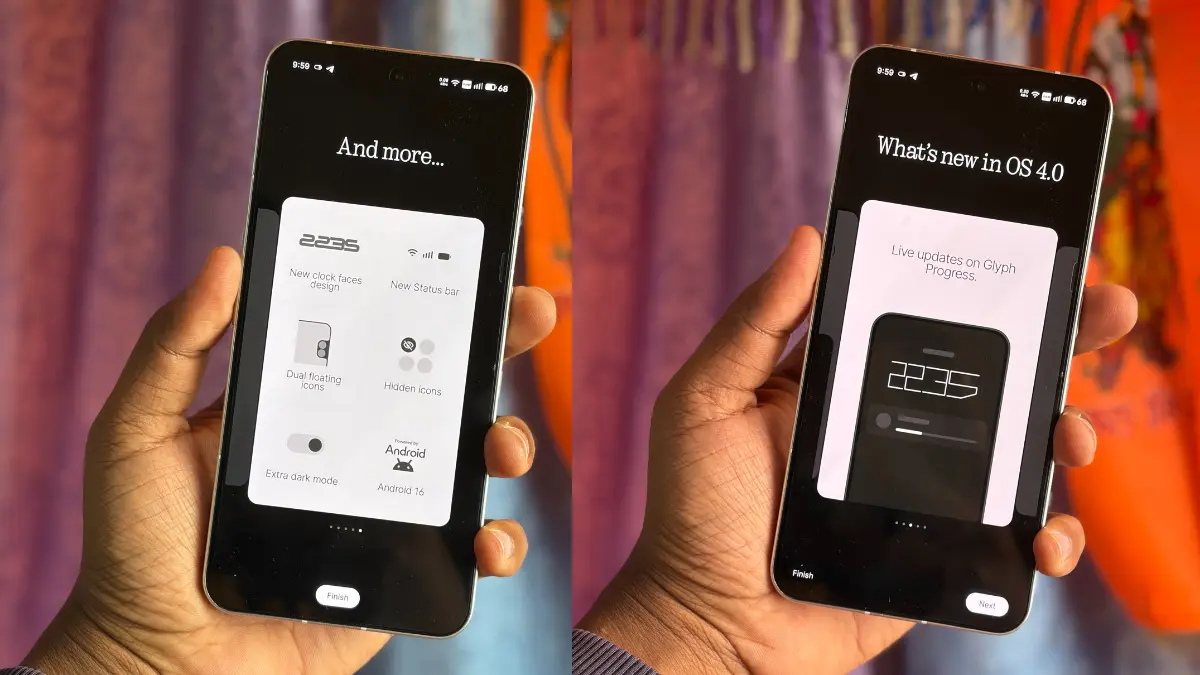
Nothing Phone 3 Nothing OS 4.0 Update has officially started rolling out, bringing a major set of new features, AI enhancements, and improved Glyph interface tools to users. This latest build (B4.0-251117-1909) introduces smoother animations, updated app icons, better privacy controls, advanced widget options, and performance optimizations that make the Nothing Phone 3 feel faster and more refined. If you’ve been waiting for a feature-rich upgrade, this update delivers a polished and more intelligent software experience.

What’s in the Update? – Nothing Phone 3 Nothing OS 4.0 Update
According to the official changelog, the update introduces key additions under three broad categories: New features, Visual enhancements, and Glyph interface upgrades.
✅ New Features – Nothing Phone 3 Nothing OS 4.0 Update
- AI Usage Dashboard: Within the Settings → Intelligence toolkit → AI usage, the system now tracks large-model AI usage when you use the “Essential Space”. This move nudges transparency and helps users monitor how much AI power is being used.
- App Hiding: You can now hide apps directly from the home screen and app drawer. Hidden apps are accessible via Home screen → App drawer → Hidden icons.
- Search Scope Control: The app drawer search now allows you to limit the scope of search results, making it quicker to find what you want.
- Widget Enhancements: More size options (e.g., Weather, Pedometer, Screen Time) for widgets. Also, most Quick Settings tiles now support 2×2 size.
- Pop-up View Improvements: Pop-up view now supports two floating icons so you can switch between them easily. Nothing Community
- System Performance Boost: App optimisation under Settings → Apps → App optimisation has been improved to enhance startup speed.
🎨 Visual Enhancements – Nothing Phone 3 Nothing OS 4.0 Update
- New app icons: The Nothing app icons have been redesigned for a fresh look. Nothing Community
- Status bar updates: Icons have been updated to be more intuitive.
- Lock screen tweaks: The lock screen password page now features a wallpaper blur effect. Two new lock screen clock faces added under Customisation. Nothing Community
- Extra Dark Mode: A deeper dark theme style is now available (Settings → Display → Dark theme → Extra dark mode) for a more immersive experience.
- Smoother transitions: System animations are improved in some scenarios for a smoother feel.
🌀 Glyph Interface Upgrades – Nothing Phone 3 Nothing OS 4.0 Update
For Phone 3 users, the update brings many enhancements to the standout glyph features:
- Flip to Glyph improvements: Better customisation of gestures and silent/vibrate mode toggles.
- Always-On Glyph Toys: Now activates via Flip to Glyph instead of timeout, making it faster to use.
- Long-awaited features return:
- Glyph Progress is back, using Live Update notifications from Android 16 for better compatibility.
- Glyph Timer comes back with refreshed animations; can be added as a Quick Settings tile or enabled via Settings → Glyph Interface → Glyph Timer.
- New “Moon Phase” Toy: A fun addition that shows how the moon looks tonight.
- Community-Confidence: A shortcut button in “Manage Glyph Toys” lets you explore community-made creations via the Nothing Playground. Nothing Community
- Pocket detection: The Glyph Interface will now temporarily disable when your phone is in your pocket — so no unwanted lighting through your pants.
Important Notes & Tips Before Updating – Nothing Phone 3 Nothing OS 4.0 Update
- As always, back up your user data (photos, call logs, contacts, etc.) before proceeding with the upgrade. Nothing Community
- Firmware roll-outs are staggered — not all users will receive the update simultaneously. This helps monitor any issues and ensure a stable rollout.
- After the update, temporary heat-up or increased power consumption may occur — this is noted in the changelog and should quickly return to normal. Nothing Community
- If you haven’t received the OTA (Over-The-Air) update yet, check manually via Settings → System → Software update.
Why This Update Matters – Nothing Phone 3 Nothing OS 4.0 Update
- Performance & responsiveness: The app-optimisation tweaks and startup speed improvements should make a real difference in day-to-day usage.
- Visual coherence: The new icon sets, UI tweaks, and extra dark mode help the phone feel more polished, which is especially welcome given today’s smartphone expectations.
- Enhanced privacy/transparency: The AI usage dashboard signals that Nothing is taking user awareness seriously.
- Unique gadget identity: The glyph features remain a differentiator for the Nothing Phone 3 — and with this update they’ve been refined in meaningful ways.
- Community engagement: The inclusion of community-made toys and apps via the Nothing Playground reflects a strategy of co-creation and ongoing support — a plus for users who like customisation and creativity.
Nothing OS 4.0. Thoughtfully designed to be easy on the eye, move smooth, react fast, distract less, and feel more personal. Let your mind flow. pic.twitter.com/zIALtAQc5S
— Nothing (@nothing) November 21, 2025Is It Worth Installing Now? – Nothing Phone 3 Nothing OS 4.0 Update
Yes — if you own the Nothing Phone 3, and you’re comfortable waiting for the OTA or manually checking for it, this update brings enough substantive upgrades (both visual and functional) to make the install worthwhile.
If you rely heavily on specific camera tweaks, or if you’re on a third-party ROM or modded system, you might want to wait a few days and monitor user feedback (especially regarding any bugs). According to the community thread, some users have asked about camera updates and security patches.
Final Thoughts – Nothing Phone 3 Nothing OS 4.0 Update
The release of Nothing OS 4.0 (Build B4.0-251117-1909) for the Nothing Phone 3 marks a strong step forward. With sharper visuals, more customisable glyph features, better performance optimisations, and a thoughtful approach to AI-usage transparency, this update helps reinforce the Phone 3’s place in the mid-to-premium smartphone segment.
If you’re still deciding whether to update: back up your data, wait for the OTA if it hasn’t arrived yet, and then enjoy the enhanced experience. Keep an eye on user feedback in the next few days too — as with any major update, early days can bring minor issues.
Content Information source:- https://nothing.community/d/47305-nothing-phone-3-nothing-os-b40-251117-1909-changelog
Also Read:- OxygenOS 16 Update for OnePlus 12R: Rollout Status, New Features & Must-Know Details