

Table of Contents
If you own a realme smartphone, you’ll be pleased to know that the company has just launched the fourth round of early access recruitment for Realme UI 7.0. According to the announcement on the official Realme Community India site, the opportunity is open to users who are willing to test new features, provide feedback, and live on the edge of innovation.
The update is rolling out not just for flagship phones, but also mid-range models — which is good news if you’re not using one of the ultra-premium devices. For example, devices like the Realme 14T, Realme 14 Pro and Realme Narzo 80 Pro have been listed in global coverage of the beta.
Whether you’re in the USA, Europe, India or elsewhere internationally, this rollout reflects realme’s intent to broaden the access and make the new UI available globally.
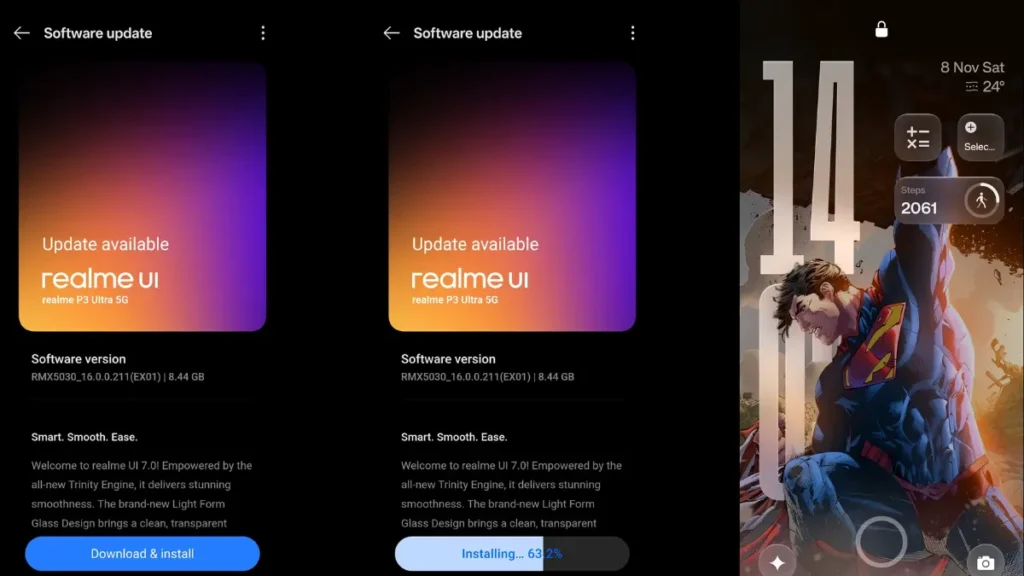
Check if your Realme smartphone is eligible for the Realme UI 7.0 Beta program. – Realme UI 7.0 Beta Update
What’s New in Realme UI 7.0? – Realme UI 7.0 Beta Update
Let’s talk features, because that’s what really gets us excited. While full details are still being shared gradually, here are the key points so far:
- The early access programme started with high-end devices (such as the Realme GT 7 Pro) and is now moving into mid-range territory.
- Specific firmware versions listed include:
- Realme 14T: RMX5078_16.0.0.200 (EX01) Gizmochina
- Realme 14 Pro: RMX5056_16.0.0.205 (SP04EX01)
- Realme Narzo 80 Pro: RMX5033_16.0.0.205 (SP04EX01)
- The Community post emphasises that selected users must be active users of realme UI features and able to share feedback. realme
What this means for you: expect new UI designs, smoother performance, maybe new customisation options — and possibly some early-beta quirks given this is an early access build.
How to Join the Early Access Program – Realme UI 7.0 Beta Update
If you’re keen to get a head start (and don’t mind living with a few bugs), here’s how to apply:
- On your realme phone, go to Settings → About Device → Version and tap the build version seven times to enable Developer Options. Gizmochina
- Then in Settings again, locate the Realme UI 7.0 banner at the top, tap the three-dots menu, choose Beta programme (or “Early Access → Apply Now”).
- Ensure your device has enough free storage (the update weighs around 3-5 GB) and charge your device above ~40% before starting the install.
- Fill in any required feedback details and submit. If accepted, your phone should receive the update in the next few days.
A word of caution: As with all beta software, some features may not function reliably. If this is your primary phone and you require full stability, you may want to wait for the full stable rollout.
Why It Matters: Global & US Context
- For users in the USA, having realme expand early access means realme’s strategy isn’t just limited to India or Asia — they’re going global.
- International users (Europe, Latin America, Middle East, etc) also benefit since the rollout into mid-range devices signals broader accessibility.
- For tech-enthusiasts and brand-loyal realme fans, this kind of early access brings a sense of community participation — you’re not just a user, you’re a contributor.
- From an SEO standpoint: if you’re writing about “Realme UI 7.0 beta update”, “how to join realme early access USA”, “realme UI 7.0 features mid-range devices international”, you’re hitting strong keywords for both US and global audiences.
Tips for a Smooth Update Experience – Realme UI 7.0 Beta Update
- Back up your important data (photos, messages). Beta updates can have unexpected issues.
- Give your device some free space — 3-5 GB may not sound like a lot, but ensure you have 6-8 GB free just in case.
- After update, explore new UI elements: check animations, gestures, customisation menus. Try them out and note any bugs.
- Join the realme Community (forums) and provide constructive feedback. Early access works better when users share issues.
- If you use your phone for critical tasks (work, communication), be cautious: have a backup plan or wait for stable release.
Final Thoughts – Realme UI 7.0 Beta Update
If you’ve been following realme’s progress, this is a smart move: realme is opening up its flagship-level features to a wider audience. The Realme UI 7.0 early access for more devices means more users globally can test, enjoy, and shape the UI’s direction. Whether you’re in the US or elsewhere, signing up gives you a chance to experiment with cutting-edge software, contribute feedback, and be part of the community.
Of course, it’s still a beta — expect glitches. But if you’re game for it, it could be rewarding.
Content information Source Official Realme:- https://c.realme.com/in/post-details/1990338661065011200 or https://www.gizmochina.com/2025/11/17/realme-ui-7-0-beta-update-now-available-for-more-devices/
Also Read:- OnePlus 15R Launch Confirmed: OxygenOS 16, 7800mAh Battery & Flagship Power Unleashed