Table of Contents
The OxygenOS 16 Update for OnePlus 12R has become one of the most awaited software rollouts in the OnePlus community, with users across the globe eager to experience the new features, performance boosts and stability improvements it promises. However, as highlighted in the latest OnePlus Community discussions, the update is being rolled out in phases, meaning not all users will receive it at the same time. Understanding how the rollout works — and why waiting calmly is important — can ensure a safer, smoother and more reliable upgrade experience for every OnePlus 12R user.
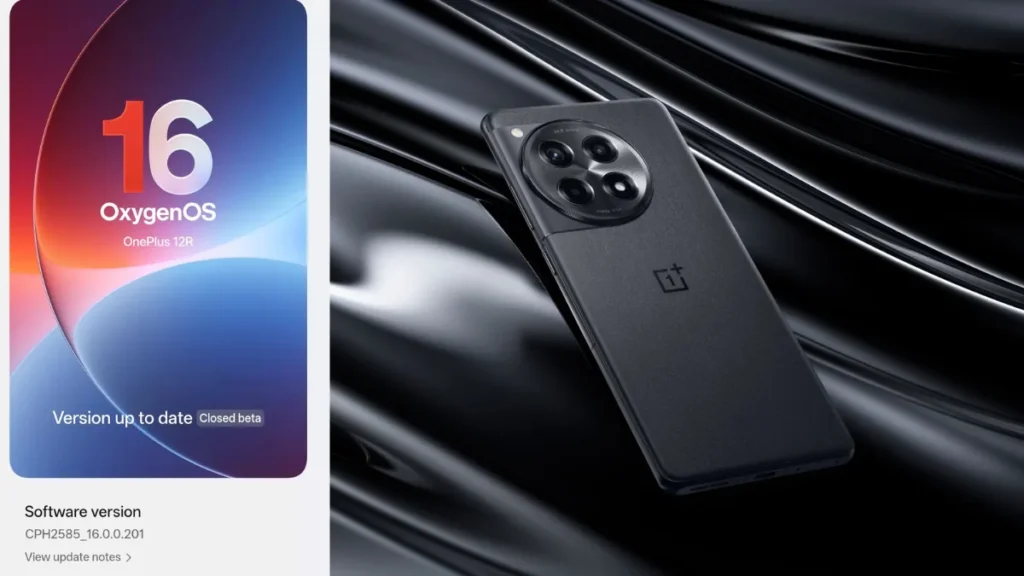
What’s the Situation with the OnePlus 12R and OOS 16? – OxygenOS 16 Update for OnePlus 12R
In a recent community thread, several OnePlus 12R users complained they still hadn’t received the OxygenOS 16 update — despite seeing announcements and posts from others who apparently have. The post advises: until OnePlus officially releases it for your region and device batch, posting repeatedly about “I still haven’t got it” won’t accelerate things.
Why does this happen?
- OnePlus uses a phased rollout strategy for major OS updates across global regions.
- Factors like region, carrier, batch number, and hardware variant (e.g., China vs global model) often dictate when you get the update.
- The manufacturer may be performing internal testing or rolling the update in waves to avoid mass issues.
Why Waiting is the Better Strategy – OxygenOS 16 Update for OnePlus 12R
Here are some strong reasons why waiting calmly might serve you better than rushing:
1. Reduced Risk of Bugs
Large OS updates (like Android 14/15/16 underlying OxygenOS 16) bring major changes: new UI tweaks, performance improvements, maybe features like spatial audio or better multitasking. But with big changes comes risk of bugs. By waiting for your batch to receive the update, you let earlier adopters pick up issues. In the community thread, the advice is not to flood the forums complaining but to just wait for the official rollout.
2. Ensured Regional & Variant Compatibility
Your OnePlus 12R’s variant (global, Indian, Chinese) matters. Sometimes carriers or component batches need tailored versions of the software. Rushing into sideloading or forcing the update can void warranty or cause issues (network, camera, stability). Waiting for the official push ensures your variant is covered.
3. Safe Back-up & Preparation Time
Major updates are a good time to back up your data, check for app compatibility, free up storage, and ensure your battery is healthy. If you force things before doing that, you risk data loss, slow performance, or bricked states.
What You Should Do Right Now – OxygenOS 16 Update for OnePlus 12R
While you wait, here are proactive steps you can take:
- Check for updates manually in Settings → System → Software update (on OnePlus 12R). But understand if it says “No update available”, it likely means your region/batch hasn’t been scheduled yet.
- Back-up your data — photos, contacts, apps, settings. Use OnePlus’s built-in backup or a cloud service.
- Free up storage: Major OS upgrades sometimes require 4-10 GB of free space.
- Update your apps: If you’re on older versions of apps, compatibility issues may occur post-update.
- Charge your phone to >50% (or connect to power) when the update begins — major updates shouldn’t be interrupted.
- Read change-logs when the update hits your device: sometimes OnePlus adds region-specific features or bug-fixes you’ll want to know about.
When You Do Receive OxygenOS 16 on OnePlus 12R, What to Expect – OxygenOS 16 Update for OnePlus 12R
While official details vary by region, here are typical features and changes OnePlus 12R users can anticipate with OxygenOS 16:
- Refreshed UI & animations
- Improved battery management & adaptive performance
- Enhanced camera features (depending on hardware)
- Better network stability and connectivity fixes
- Security patch upgrade
- Possibly Android version bump underneath (e.g., to Android 14/15/16 depending on region)
When the official rollout begins for your region, you’ll want to review the release notes and check forums for early user feedback just in case there are any known issues.
What to Do If You Still Haven’t Got the Update After a Long Time – OxygenOS 16 Update for OnePlus 12R
If you’ve waited a significant time (weeks after your region’s launch) and still no update, here’s what to check:
- Confirm your phone’s model number and region variant (Settings → About Phone).
- Make sure you’re on a supported build version (sometimes you need a minor incremental update before the major one).
- Check whether your device is rooted or modified — updates often get blocked.
- Visit the OnePlus Community forums (for example the thread we referenced) and check whether other users in your region have received or are waiting.
If you’re still stuck, you may contact OnePlus support — but avoid “force flashing” or “sideloading” unless you’re confident and understand the risks.
Conclusion – OxygenOS 16 Update for OnePlus 12R
The takeaway? With your OnePlus 12R, waiting calmly for the official OxygenOS 16 rollout ensures a smoother, safer, and better upgrade experience. You’ll minimize bugs, avoid variant-mismatch issues, and be fully prepared — when your phone eventually prompts you to install, you’ll be ready.
Stay tuned, back up your data, keep your apps updated, and once your region’s batch begins rolling out, enjoy the new features with peace of mind.
Content information Source:- https://community.oneplus.com/thread/1997420038759383047
Also Read:- Lava Agni 4 Launched: Price, Features, Specs & Early Sale Details Revealed